Wednesday, 10 March 2010

Notes and reflections about the second annual scrum meeting in Portugal

A month ago I attended the second annual Scrum Meeting in Portugal, and ended up taking some notes about two of the presentations.

Here they are, both for the team at weListen, and for the world at large.

Notes on "A Practical Roadmap to Great Scrum:A Systematic Guide to Hyperproductivity" presented by Jeff Sutherland

This was the presentation that changed the way I perceive scrum. Where before I saw scrum as an agile software development methodology like xp, now I see it as a management and process template. This means a team should use scrum and complement it with technical practices. Apart from that, the largest focus to me was on 3 velocity multipliers for teams and 2 required practices for hyper-productive teams.

The 3 velocity multipliers are ready, done and self-organization. Ready and done shield an iteration from churn. A story only enters development when it is ready, and by the end of the sprint it should be done. Ready means that the story is understood and sized by the team with input from the client, and done means the same story is tested and approved to be deployed. Self-organization ties nicely into the two required practices mentioned: talk about problems and fix the same problems.

Two classes of problems mentioned: bugs that take more than 8 hours to fix, and stories that take more than twice the calendar time than estimated ideal time. For each bug or story in this situation, do a root cause analysis to figure out the underlying problem. This can be multitasking (a dev assigned to several projects), final inspection or testing done too late or interruptions and form the basis of an impediment list for the team together with the product owner and scrum-master to solve.

There were several interesting data points mentioned. In a given company, the peak of productivity was measured on 60 hour work weeks in waterfall projects, and on 30 hour work weeks with double story points delivered. This means an productivity increase of about 3 to 4 times. Part of the presentation used Systematic, a dutch software company as the source for several data points for scrum teams. They noticed a linear scale in developer productivity for project sizes, going against Brook's Law, although I think the Law mentioned adding people to an already late project, and didn't mention scale. They apparently implemented scrum using Mary Poppendieck's lean tools as described in her book.

Some "required truths" about hyper-productive teams were discussed, and I found them interesting insights. The ones that stuck to my mind the most were:

  • Everyone must be trained in scrum. This is so that all the players follow the same playbook and the concepts and practices are well understood.
  • Backlog must be ready to implement before the sprint, and done by the end (tying into the concepts of ready and done mentioned earlier) .
  • Pair immediately on a task if there's only one person capable of handling it, to avoid bottlenecks in the throughput.
  • Short sprints (often just one week)
  • Servant leadership, where the product owner and scrum-master are a resource of the team, instead of using the team as a resource.
  • No multitasking. This one I'm a bit curious as to how realistic it is, considering maintenance work, and teams with many past projects.

Overall it was a very interesting presentation. There are several videos on youtube with Jeff Sutherland about scrum. This one is very similar to the one I saw.

Notes on "Scrum and TFS 2010" by Mitch Lacey

This was mostly a storytelling and demo about new features in TFS. I did end up asking Mitch about the importance of accounting for time originally estimated, time in task and time remaining for small and recent to scrum teams, as to me it seemed a bit too much bureaucracy for a small team. The answer was enlightening, since those numbers are particularly important for those teams as a way to surface problems (either with estimation, delays, interruptions or other causes). This means I might start looking into accounting for such numbers. "You can't manage what you don't measure". When a team gels and is proficient, the numbers may not matter as the team starts getting into the groove and noticing impediments becomes intuitive.

Sunday, 24 January 2010

OCD and filenames, as pertaining to TV series

I like all my file names to be similar, and this applies to both mp3 and series. For mp3 I use the wonderful foobar2k to tag and rename files, but for series I ended up coding my own formatter. All this assumes a linux system (as is my home server, flatline)
First of all, to extract the video files from the rars:

find -name "*rar" -type f -exec rar e {} \;
This extracts all rars from under the current directory (and subdirectory) into the working directory.
If the files already come uncompressed, but are in subdirectories:
find -name "*mkv" -type f -exec mv {} . \;
Replace mkv with avi if that's what you've got.
Now, sometimes the files come in different formats. Some have [season][episode], others [season]x[episode], and I'd like for them all to be in the same [title]S[season]E[episode] format.
For that all you need is the following python script:


It can take 2 arguments: the directory where the file names are, and a title that overrides the one found in the file names. Hope this is helpful for someone else :)

Sunday, 3 January 2010

Just replaced the fan on my laptop

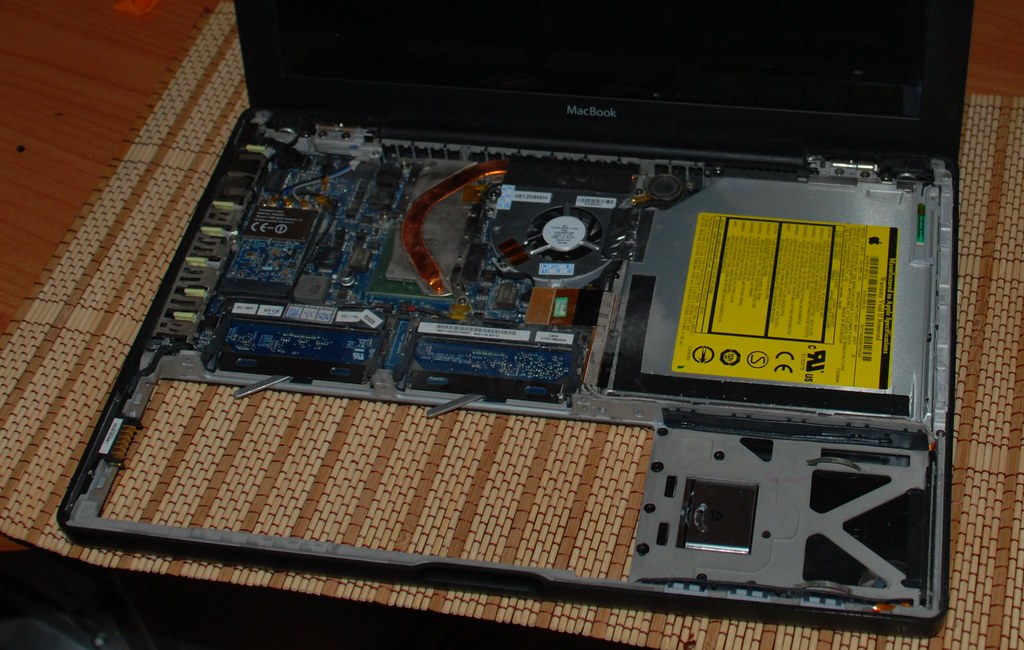
For a couple of months my macbook's fan has been a bit on the fritz. Sometimes when the CPU got a bit hot it started making some noises and once in a while stopped working completely.

The repair would most likely cost me about 100€ (50 for the fan, 50 for replacing it), so I decided to look up if anyone sold those. Thankfully a store in Hong-Kong does, and they ship international (they're called eeshop). It took a while to get here (a month and a half, perhaps) but for 10€ that's not a big issue. I did ask after a while if it was supposed to take so long, and answer was prompt (apparently the postal office was swamped).

Opening the laptop was another issue. First attempt failed when some of the screws were a bit too small for the screwdrivers I was using, so today I went and bought a new set with a better grip. After removing the screws, I just had to take care to remove the connection for the trackpad and slide the keyboard left to remove it. Opening it gave me access to the internals as you can see on the left. Replacing the fan was a matter of just removing the connector, two screws and taking it off. The right screw was hidden under some cables, but gently pulling them off gave me access to remove it.

I do have to say, putting it all back again was a bit difficult, since on the right hand there are some "hooks" that you need to slide the keyboard plate into, and that wasn't trivial. Other than that it was easy.

And now my laptop doesn't scream anymore when hot! And it cost me just about 15€ plus an hour and a half. Yay.

Saturday, 26 December 2009

My presentation for netponto about Lucene.net

A couple of weeks ago I did a presentation for a .net user group (netponto) here in Portugal about Lucene.net, an open source textual search engine. You can see the slide deck here, and I've uploaded the source code used in the demo to my github page.

What went well

Using git (with the git-extensions gui) to bookmark the various steps I wanted for the code demo. This is something that surprised me on how well it worked and actually ended up being remarked upon. It also generated a few questions about git that were answered mid-demo in a bit of a detour.

The pattern here is to build the demo as a series of linear git branches, each a small step in the demo, and instead of writing the code in-loco at the demo or storing snippets to be used, I just move up along the branches. Each step is small and self contained, and I spend more time just highlighting the important parts and the decisions I made and less time typing.

Also, using git gives me the advantage to rewrite history, so that if I figure out that the demo app needs to have a foo somewhere from the start, I can switch to the root branch, make the edit, and rebase the branches to update them with the change. With some care, this propagates the change upwards with little to no conflicts.

Short deck of slides, demo with ongoing q&a. While the initial presentation didn't take long, the demo ended up going into overtime. If there's no hard and fast timebox, this is good, otherwise answering questions in the middle of the demo can push a well timed demo out of its allotted time. But the audience seemed to be enjoying it, and I think this helps spread knowledge a bit better than just giving a presentation and showing code.

What could have been better

The "oh dear, a crash" gimmick had an interesting effect, but I think it was wasted on a slightly minor point. A better and more important part to emphasize would have been the impact of the analyzer on both indexed fields and search query. I should have had an unexpected result for a search be the "crash" and not the lack of values for fields.

I used a transition I saw on slide:ology in 3 slides, which while cool, might have been more distracting than useful. On the other hand, I think it emphasized the fact that the index was shared between the indexer and the searcher, which part of the point I was trying to make.

What I'll improve

Relax. Although the feedback I gathered from some of the audience was that it didn't show, I felt like I had zipped through the initial presentation. Ended up taking a bit of a breather while answering questions.

Might be interesting to consider dropping even more slides in detriment of more code. Although I think there's a minimum needed to intro the subject matter. Otherwise people will look at the code but the concepts will not gel.

Feedback

If you were there, I'd love to hear from you. I've received the report from Caio with the flattering comments, but I'd also love to hear your opinion on what could have been improved.

Sunday, 30 August 2009

I wish I could put 4gb of ram on my macbook...

According to an article on cnet Snow Leopard boots by default into a 32-bit kernel and mentions that macbooks with an older, 32-bit EFI chipset (which handles the early boot process) cannot boot the 64-bit version.

Although having a 64-bit kernel would be good, I'm more interested in the side effect of the 32-bit chipset memory limitation. The same article mentions that a 32-bit EFI chipset cannot address more than 3Gb of ram. Since most likely this is the chipset installed on my mac, I think that's the reason why 4 Gb are not supported. I wonder if the chipset could be replaced. Doubt it, since it must be soldered into the board.

Sadly, that's pretty much the largest reason I'm envious of the new macs. 2 gb isn't much, specially if you're like me and have tons of apps loaded all the time.

Wednesday, 19 August 2009

Man, it would be awesome to go...

Roy Osherove is giving an hands-on TDD Masterclass in the UK, September 21-25. Roy is author of "The Art of Unit Testing" (http://www.artofunittesting.com/), a leading tdd & unit testing book; he maintains a blog at http://iserializable.com (which amoung other things has critiqued tests written by Microsoft for asp.net MVC - check out the testreviews category) and has recently been on the Scott Hanselman podcast (http://bit.ly/psgYO) where he educated Scott on best practices in Unit Testing techniques. For a further insight into Roy's style, be sure to also check out Roy's talk at the recent Norwegian Developer's Conference (http://bit.ly/NuJVa).


Full Details here: http://bbits.co.uk/tddmasterclass

Update:

bbits are holding a raffle for a free ticket for the event. To be eligible to win the ticket (worth £2395!) you MUST paste this text, including all links, into your blog and email Ian@bbits.co.uk with the url to the blog entry. The draw will be made on September 1st and the winner informed by email and on bbits.co.uk/blog

Saturday, 8 August 2009

Windows 7 blues

why haven't I learned yet not to go for first releases?

With Windows 7 reaching RTM status and the general low working demands of August, I decided it was time to kick Vista to the curb on my dev machine and get myself a brand new shiny OS.

Triple-headed Blue-screens

Because it can never be two easy, the upgrade experience ended up being rather painful, with both attemps resulting in blue screens before the setup was finished. Deciding that perhaps it was some conflict with device drivers, one of the many programs I had installed or just bad luck, I decided to cut my losses and just repave the system partition to do a clean install.

Still no joy. Same bluescreen at the end of the setup.

The dev machine's most unusual part is the two NVIDIA display adapters installed on the PCI-E slots, which are used to drive 3 monitors. Remembering that vista also had some troubles with the secondary adapter, I removed it and gave it another shot.

Yap, that worked. Setup finished and gave me a brand new Windows 7 installation to play with.

You no like restart?

With a folder full of drivers for the display adapters, chipset, SATA controllers and audio, I spent some time updating them before heading home. Somewhere around the end ,after a restart, another bluescreen.

That's no good.

After some fiddling I found out that it only happened on a restart, and never on a cold boot.

Oh well, that's a bother but at least it's work-around-able. Off I go to install sql server, visual studio and a miriad of essential software for a dev machine. Thankfully with portable apps living in a dropbox folder most of it takes little to no time at all.

System Interrupts should not interrupt all the time.

Some time afterwards, while installing some software I decided to look at resource monitor as a source of "oh, look at all that data" entertainment.

And it showed "System Interrupts" using about 40% of the cpu, all the time. What. The. Hell. At first I thought it would have something to do with the troublesome display adapters, and reverting to the standard VGA adapter driver reduced the usage, but it still was too high (about 20, 25%)

Again, after some fiddling around, uninstalling drivers, disabling devices I found out that the problem was with the "Marver 88SE611 SATA V12069" drivers. Reverting the drivers to the default drivers makes the cpu usage go back to normal.

Sadly, the reboot bluescreen still appears from time to time. I think it always happened when the second display adapter was installed, but I'm not sure.

In a nutshell.

  • When upgrading/installing, remove the secondary display adapter.
  • With two display adapters, don't reboot (away from the machine)
  • Don't install the Marvell SATA driver
  • Get a rabbit's foot.

I do hope the reboot bluescreen gets fixed soon, but for now I'm happy with having a usable machine.

In the case someone has the same problem, this machine has the following specs:

  • Core2Duo E8400
  • 4 x 2Gb Kingston ValueRam
  • Asus P5Q Pro
  • NVIDIA 7300 LE
  • NVIDIA 7200 GS
  • Western Digital 150Gb Velociraptor
  • Seagate 200Gb