Showing posts with label macos. Show all posts

Sunday, 3 January 2010

Just replaced the fan on my laptop

For a couple of months my macbook's fan has been a bit on the fritz. Sometimes when the CPU got a bit hot it started making some noises and once in a while stopped working completely.

The repair would most likely cost me about 100€ (50 for the fan, 50 for replacing it), so I decided to look up if anyone sold those. Thankfully a store in Hong-Kong does, and they ship international (they're called eeshop). It took a while to get here (a month and a half, perhaps) but for 10€ that's not a big issue. I did ask after a while if it was supposed to take so long, and answer was prompt (apparently the postal office was swamped).

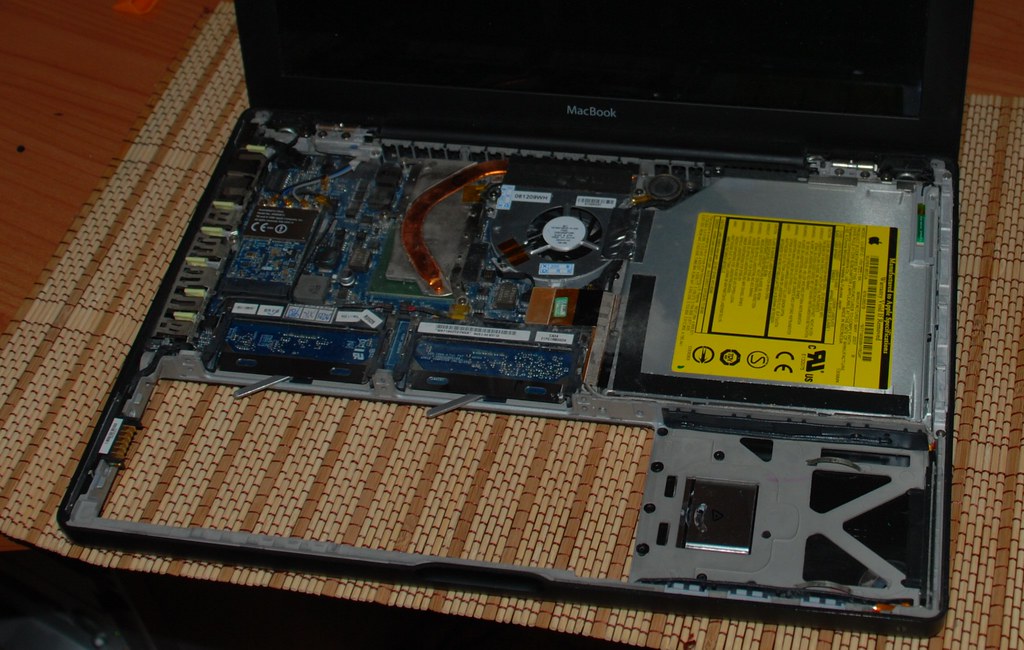
Opening the laptop was another issue. First attempt failed when some of the screws were a bit too small for the screwdrivers I was using, so today I went and bought a new set with a better grip. After removing the screws, I just had to take care to remove the connection for the trackpad and slide the keyboard left to remove it. Opening it gave me access to the internals as you can see on the left. Replacing the fan was a matter of just removing the connector, two screws and taking it off. The right screw was hidden under some cables, but gently pulling them off gave me access to remove it.

I do have to say, putting it all back again was a bit difficult, since on the right hand there are some "hooks" that you need to slide the keyboard plate into, and that wasn't trivial. Other than that it was easy.

And now my laptop doesn't scream anymore when hot! And it cost me just about 15€ plus an hour and a half. Yay.

Sunday, 30 August 2009

I wish I could put 4gb of ram on my macbook...

According to an article on cnet Snow Leopard boots by default into a 32-bit kernel and mentions that macbooks with an older, 32-bit EFI chipset (which handles the early boot process) cannot boot the 64-bit version.

Although having a 64-bit kernel would be good, I'm more interested in the side effect of the 32-bit chipset memory limitation. The same article mentions that a 32-bit EFI chipset cannot address more than 3Gb of ram. Since most likely this is the chipset installed on my mac, I think that's the reason why 4 Gb are not supported. I wonder if the chipset could be replaced. Doubt it, since it must be soldered into the board.

Sadly, that's pretty much the largest reason I'm envious of the new macs. 2 gb isn't much, specially if you're like me and have tons of apps loaded all the time.

Thursday, 11 June 2009

Dr. Googlelove or: How I Learned to Stop Worrying and Love the Cloud

written in full blown hipster <censured> mode on a macbook, listening to an ipod and sipping an iced mocca at a starbucks.

Having three different machines that I work with daily tends to cause me some pain whenever I try to send an email from the two that are work/fun related. I've got 3 pcs that I use on a daily basis:

  • My personal laptop is a black Macbook called mac-sendai. It handles my email, IM, photos, videos and contacts. My social life is stored in it, being it work or personal and I carry it around for most of the time.
  • My home machine is armitage. It's a Windows XP machine that I use mostly as a gaming/movie machine.
  • My work machine is 2finn. It runs Windows Vista 64 and is my main development machine at the office.

From each of the 3 pcs I usually need to send off emails. I use Gmail on any of the desktops and Mail.app on the laptop. Since mac-sendai handles the social part, my address book there is where I aggregate and collate most of the information about contacts and sync both the cell phone and an ipod touch to it.

Up until now the only connection to the cloud was from the laptop to Plaxo, to get auto-updates for contact information of friends and "business associates". It works rather well and the best way to prove it is that most of the time I don't even notice it.

But lately I've noticed that OS X is able to sync remotely to google contacts, and since I use gmail on the desktops, having it synchronized with the address books is the last step in having a always available and up to date contact store on all machines, with the added benefits of remote backups (besides the time machine I store at home).

So nowadays here's the replication flow for my "personal network":
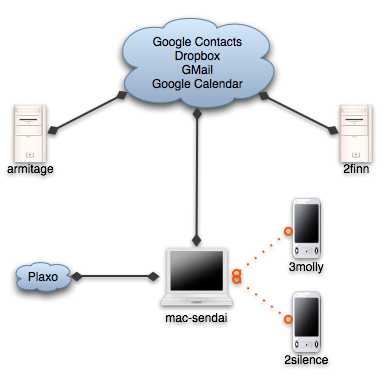
Sync network

  • Dropbox handles the "utils", which are about 50 or 100 megs of portable apps including notepad2, gnu utils and Launchy's preferences, current working set documents, emacs site-lisp and .emacs. Some time ago I used foldershare for the utils, but it was too finicky, and with hard links from the dropbox to the correct places, it all works much better.
  • Gmail handles the email. I've used IMAP even before gmail on all desktop programs and now on the ipod touch, so I haven't even thought about that particular issue for a while.
  • Google Calendar keeps some of my appointments, with a shared calendar for weListen.
  • And now, Google Contacts stores the emails and phone numbers for my little social network.

The migration of contacts ended up costing about half an hour of deduplication and merging, but thankfully the address book includes a shortcut to merge contacts, so most of the time it was spent cleaning up emails that I don't need and just checking the contacts to see that nothing was mangled.

My biggest worry now is that the address book will become bloated. GMail adds any address that you send email to to the contacts list, and most of the time if it's a one time only reply I won't want it to be replicated, so the jury's still out on how I'll handle that.

But for now, I'm a happy camper. No more copy pasting of emails, and my inner software engineer feels more confortable at not having duplicated information spread around.

Edit: thanks to Edgar Gonçalves for the title fix :) In my defence Starbucks had no wifi, and I was unsure of the correct title :)
Sunday, 7 December 2008

2 more apps I end up installing on all computers I use.

Foldershare, set to sync my utils folder, which includes putty, teracopy, some gnu command line utils, a couple of scripts to start and stop services, .net reflector, keepass binary, notepad2, and some other portable apps that I end up collecting over time.

Dropbox, mostly for the public folder. The explorer/finder integration is a wonderful piece of magic. Dropping a file on the public folder and using the "Copy the public link" item on the context menu ended up being my favorite way to share files with the world.

Friday, 26 September 2008

v1.2 of BuxferSubmit

Version 1.2 is up at the project's page.

Direct link

Changes:

  • Uses jQuery for the async request.
  • Stores the user's password in the user's keychain (thanks to Stan Lemon for the code and plugin)
  • Minor interface tweak (pressing enter when on the tags text field submits the transaction)

That's all for now. I'd love to get some tag auto-complete, but getting a good interface for it has proven difficult.

Tuesday, 2 September 2008

v1.1 of BuxferSubmit

For the impatient:

New version. Should not freeze if Buxfer is slow to respond or if you forget to plug in the cable. Also some better handling of special characters while talking to the server.

Download here.

For the curious:

Buxfer seemed to have had a bit of trouble with site slowness, which exposed my cluelessness in developing widgets that connect to web services (as in, forgot to consider timeouts of XMLHttpRequests).

I was a bit amazed to find neither much info on Apple's site nor on the web on how to best handle these problems. Ended up just setting a timeout before the request, clearing it on success and canceling the request should the timeout happen. Perhaps I should look into a javascript library such as mochikit or jquery to help with the heavy lifting.

Also, most of the code feels to me a bit fragile. The error handling is primitive, and the fact that the request is async makes me a bit queasy. I'll chalk that up to immaturity on my part in developing in javascript, but I hope to have the time to refactor it a bit.

As I said before, the code is up on google code, so feel free to browse around, all three of you who are reading this :)

Saturday, 30 August 2008

Google Code page for the widget

Well, instead of just having a zip file containing the source code, I decided to put it up on google code. The page is here and I've updated the homepage to include a link to it. The releases will live there, also, and I think I'll look into getting the widget to autoupdate or something, with the files on google code I think I can get an rss feed to the releases.

I'll keep y'all posted.

Buxfer widget

If you follow my twitter feed, you may have noticed that I’ve created and published a small widget to use with buxfer here. Right now it’s just two forms, one to submit and one to configure, and it isn’t all that smart at what it does.

My intent is to keep the interface simple, but to improve on three points:
- Usability-wise, I want to be faster at adding the transaction, and perhaps have some suggestion or completion for the tags. Right now it is a bit dumb, and doesn’t provide much help besides being a form.
- As far as the interface goes, I want it to occupy a bit less space, and to be prettier. As you can see on the screenshot, the widget uses the standard parts and the labels have the default size. I think I can do better than that and still keep it usable.
- The configuration is stored on the preferences cache for widgets Apple provides, which isn’t quite the best choice as far as storing sensitive data. I should put it in the keychain, and perhaps even use the same as Safari.

I was quite impressed with the ease with which you can produce widgets. Having Dashcode helps a lot, both with the layout of the forms and the debugging of the code. Widgets being based on javascript and html gives them a low entry cost if one is already used to client-side web programming, and opens up the opportunity for some rather interesting moves, such as using JQueryUI or Moo on the widget.

If you’ve tried the widget and want to leave feedback, please, feel free to contact me or to drop a comment here :)