Showing posts with label windows. Show all posts

Monday, 4 October 2010

Zero-friction deployment: from local to github in one powershell command

Short version:

Code is here, depends on a dll here and here. Allows for a powershell script to upload a file to github.

Long version:

There are one core belief powering this post:

- There should be zero friction in getting a software release out in the open. In the age of build scripts and APIs and everything over http there is no reason a human should be involved in cutting a version except in the decision to make it so.

The main side effect of having very little to no friction in cutting a release is that it happens way more often, since there is no reason not to do it if the code is good to go.

In this particular case, all I lacked was a way to upload a file to github. The packaging was already done, courtesy of psake+write-zip. Having found nothing in the powershell world to do it, I ended up “porting” part of a ruby script.

Github stores files in Amazon’s S3, so there were two steps to uploading a file:
-Telling github that the file exists and getting a token to pass to S3.

-Uploading the file itself to S3 using the token gotten from step 1.

The biggest issue ended up being that WebClient doesn’t handle POST’ing to an url with MIME values, which is what S3 expects in this scenario. Using the underlying *thingie* directly from powershell would bit a bit harder and more prone to errors, so I just used an existing helper to upload the file correctly.

The powershell code that uses it is available here, with another extra dependency on the Html Agility Pack to scrape the downloads page for info on existing downloads.

The function itself (not iet a full commandlet due to lack of time) is upload_file_to_github:

function upload_file_to_github($login, $repo, $api_key, $file, $filename, $description){
    [void][System.Reflection.Assembly]::LoadFrom((get-item "lib\Krystalware.UploadHelper.dll"))
   
    $full_repo = $login+"/"+$repo
    $downloads_path = "http://github.com/"+$full_repo+"/downloads"
   
    $post = new-object System.Collections.Specialized.NameValueCollection
    $post.Add('login',$login)
    $post.Add('token',$api_key)
    $post.Add('file_size',$file.Length)
    $post.Add('content_type',"application/octet-stream")
    $post.Add('file_name',$filename)
    $post.Add('description',$description)
    $wc = new-object net.webclient
    $upload_info = [xml][System.Text.Encoding]::ASCII.GetString($wc.UploadValues($downloads_path, $post))
   
    $post = new-object System.Collections.Specialized.NameValueCollection
    $post.Add('FileName',$filename)
    $post.Add('policy',$upload_info.hash.policy)
    $post.Add('success_action_status',"201")
    $post.Add('key',$upload_info.hash.prefix+$file.Name)
    $post.Add('AWSAccessKeyId',$upload_info.hash.accesskeyid)
    $post.Add('signature',$upload_info.hash.signature)
    $post.Add('acl',$upload_info.hash.acl)
   
    $upload_file = new-object Krystalware.UploadHelper.UploadFile $file.FullName, "file", "application/octet-stream"
    [void][Krystalware.UploadHelper.HttpUploadHelper]::Upload("http://github.s3.amazonaws.com/", $upload_file, $post)
}

As you can see, it’s just a normal POST to the web to notify github of a new file, interpreting the response as xml to extract needed information for the S3 POST. That one uses the helper to pass the parameters as MIME-encoded values.

I have to say, using xml in powershell was a lot easier than I thought it would be. I wonder if JSON is equally well supported…

Monday, 20 September 2010

Forked dbdeploy.net

Dbdeploy.net is a database change management library, used by us at weListen to track the changes made to a database in the scope of a project and apply them as needed. It takes a folder full of ordered files containing the change scripts in sql and applies them as needed to a given database. It tracks which changes have been applied in a special table.

We’ve used for quite some time, and were mostly happy with it, except when using it from the command line on the servers. The msbuild task worked well to obtain and apply the changes, but the command line application added extra information to the output that needed to be trimmed before applying it to the server.

Well, it annoyed me enough to fork it from its home at sourceforge to a new place at github.

I refactored to projects a bit, to exclude a direct dependency on NAnt, and added a Dbdeploy.Powershell assembly with 3 commands:

  • Export-DbUpdate, which outputs the scripts that need to be applied. Can write the scripts directly to a file;
  • Push-DbUpdate, which applies the changes to the database (still has a bug when using with SQL Server, as I need to split the resulting script into batches);
  • Select-DbUpdate outputs information about which sets need to be applied;

All of these commands take a path to a config file describing the database type, connection string and table name to store the changelog, and the directory where the actual changesets exist.

Also, instead of mucking about with NAnt as the build script host, I’m using psake. I really can’t stand using xml to describe build steps anymore.

To use it just download the release, and in powershell “import-module Dbdeploy.Powershell.dll”.

Monday, 6 September 2010

Anatomy of a command

Creating an IronPython command to launch the command prompt isn’t much, since you can have a shortcut to do just that.
You might have noticed that the command subclasses “BaseIronPythonCommand”. This is an abstract class that implements the basics and just leaves the Name and the Execute method for you to implement:
image
There’s also an interface you can implement directly (IIronPythonCommand) if you want to assume control of everything.
BaseIronPythonCommand’s implementation is quite simple. Most of it is boilerplate for a Blaze plugin, leaving only the name and execution to be done in the script:

GetName is the name used to invoke the command. It should be something unique and descriptive. A long name is good, and you can teach Blaze a shortcut to it by typing the shortcut and selecting the command on the dropdown box. This teaches blaze about the shortcut.
GetDescription returns a description for the command, to be shown on the line below it on the interface.
AutoComplete returns a completion for the given string. This means you can transform “off” into “office” inside your command.
Execute tells the command the user has selected it. The command returns either a program to execute in the form of a path concatenated with the arguments, null if the command has executed itself.
Any one of these can be implemented in ironpython, although for basic commands you only need to implement GetName (or a property called Name) and Execute.

Wednesday, 1 September 2010

Tutorial: How to create your own plugins for Blaze-IronPythonPlugins (BPP)

On the first post in this series I presented Blaze IPP, which allows for scripting of a launcher using IronPython. Here I tell you how you can write your own plugins from scratch. It will be a short post.

First of all, I assume you’re already running Blaze with the plugin installed.

Let’s create a new directory under “Plugins” to store our new plugins. This way if any future upgrade on IPP brings an ironpython file with the same name, your plugin will not be overwritten. We’ll call it LocalIronPythonPlugins:

Untitled

Now, configure IPP to also monitor that directory. Call Blaze, right click on it and in the “settings” open the “Plugins” tab. Select “IronPythonHostPlugin”, “Configure” and add the newly created directory (you can either browse to it with “b” or you can paste the path into the text box):

Untitled2

Now that we have a clean directory to work with, let’s create a file called “OpenCommandLine.ipy”. Open it and add the following code:

As you can probably guess, this will create a new command named OpenCommandLine, and when you select it it will open a new command prompt. IPP is clever enough to know that if a command returns a string, it is a program to be executed.

This is just a simple example to get you started. Since this is IronPython, you can use the entire .Net framework and fetch things from the web, open the registry, connect to a remote host or start a service, to give a couple of examples.

Monday, 30 August 2010

Creating plugins in IronPython for Blaze, an application launcher.

Everyone loves the start menu from Windows Vista/7, but compared to Launchy, Quicksilver or any other application launchers it’s a bit anemic. No wonder, since it’s just a search over your start menu and indexed locations.

But even any one of those is a bit lacking in support for runtime extensibility. You can create plugins, but it involves C (or Objective-C in the case of Quicksilver) and restarting the app. Not very friendly for those cases where you just want to pick up the currently selected object and throw it over an scp connection autocompleted from your favorites.

Enter Blaze + IronPythonPlugins. Blaze is a .Net application launcher for Windows that includes a learning facility that tries to complete repetitive tasks for you. IronPythonPlugins is a plugin itself for Blaze that hosts simple plugins written in IronPython.

If you want to try it just download the latest version from here. It includes a version all ready to use. Start the app, call it with Ctrl+Alt+Space and try a couple of plugins:

  • Open windows explorer, select a text file, call blaze and type “edit with notepad2”. If you have notepad2 in your path, it will be launched with the selected file opened.
  • If you use putty (the ssh terminal), “putty <name of session>” will launch putty with that session. Here session is autocompleted, so if you have a session called “my.home.box”, typing “putty home<tab>” will autocomplete to “putty my.home.box”.
  • Type “random-text <number>” and your clipboard will have up to <number> random letters. Useful to generate test data.

There are a couple more plugins in the “Plugins\IronPythonPlugins” directory, so if you’re interested in how it’s done, open them in your editor of choice. In the next few days I’ll do a couple of posts on how you can create your own plugins without having to guess from the already existing ones.

If you want to change anything edit the file, save it and Blaze will automatically pick it up, together with any other .ipy file in that directory that has changed. If you open Blaze’s configuration page for the plugin, you can add other directories to search for .ipy files. Useful to keep your personal plugins separated from the “official” ones.

Sadly errors are still only sent to a System.Diagnostics.Debug, so if you edit a file and can no longer use it, open DbgView, edit the file again to force blaze to reload it and be on the lookout for output starting with “Error with file”. There will be a stacktrace telling you what you did wrong.

So, try it, have fun and comment on it. I’d love to hear what other people think of it.

Wednesday, 17 March 2010

Using ironpython to generate nhibernate mapping files from a fluent configuration

I admit, this is a bit of a goldberg machine, but here's the context:

In my current project we need to store a bunch of events related to some 20 entities. Those events are the same for all entities, and they all need to be stored in the database. We use NHibernate to handle the "talk to the database" part, and fluent-nhibernate to configure the mappings via conventions for the most part. There are some entities which are either manually mapped or have specific overrides for particular cases (manually mapping some entities and automapping others is a mistake I think I'll avoid in the future).

For the most part this setup does wonders. We can add and change our entities and the mappings are generated without we thinking much of it. Since development speed has a larger priority than runtime speed in this project, we don't have much problems with the default mappings that are generated.

Except in the case of those events. Since the events are the same for all the entities, the event classes are open generics. Now, nhibernate can't map open generics, but can map closed generics, which is how we do it. We just iterate through all the types in the assembly that correspond to our entities and map those with fluent. The problem then becomes one of performance. As of now there are about 500 generated classes, and those take a while to discover and map. Since we're using fluent nhibernate to configure it in runtime, this means that each time the app is restarted there's a small downtime (on the scale of about 1 minute). While that's not much for an app in production, while developing one tends to restart the app a bit often. That's a problem in the day to day work.

I used our integration test suite to time the mapping, and on my pc it took about a minute to run. On the other hand, if we already have an .hbm file to feed to nhibernate, we can shave about 30 to 40 seconds. That's less than half the time for a simple trade-off of having to know when to generate the mappings.

To generate the mapping we could have created a new console project to just call the correct methods on our session provider factory, which would be a bit overkill. All we needed was to setup the environment and ask fluent for the mapping file.

And here is something that IronPython shines in.

Just create an .ipy file, add references to the correct assemblies, and since there's a clear separation of concerns (or so we hope), it's easy to configure fluent and ask it to generate the mappings for us. Most of the time you'll use .net code like you do in c# or vb.

There are only a couple of issues here:

- We need to remember to regenerate the hbm files when classes/mapping changes

- We need to remember to recompile both before and after regenerating hbms. Since we're loading the assemblies with ironpython outside of visual studio, the script doesn't know if the assemblies are stale or not.

Most of this can be avoided by having a build server rebuild the hbm files on its own and fail the build if they don't match with the latest in the source control. Of course, we could just have it commit the files, but that's one step I'm not fully comfortable with.

Saturday, 26 December 2009

My presentation for netponto about Lucene.net

A couple of weeks ago I did a presentation for a .net user group (netponto) here in Portugal about Lucene.net, an open source textual search engine. You can see the slide deck here, and I've uploaded the source code used in the demo to my github page.

What went well

Using git (with the git-extensions gui) to bookmark the various steps I wanted for the code demo. This is something that surprised me on how well it worked and actually ended up being remarked upon. It also generated a few questions about git that were answered mid-demo in a bit of a detour.

The pattern here is to build the demo as a series of linear git branches, each a small step in the demo, and instead of writing the code in-loco at the demo or storing snippets to be used, I just move up along the branches. Each step is small and self contained, and I spend more time just highlighting the important parts and the decisions I made and less time typing.

Also, using git gives me the advantage to rewrite history, so that if I figure out that the demo app needs to have a foo somewhere from the start, I can switch to the root branch, make the edit, and rebase the branches to update them with the change. With some care, this propagates the change upwards with little to no conflicts.

Short deck of slides, demo with ongoing q&a. While the initial presentation didn't take long, the demo ended up going into overtime. If there's no hard and fast timebox, this is good, otherwise answering questions in the middle of the demo can push a well timed demo out of its allotted time. But the audience seemed to be enjoying it, and I think this helps spread knowledge a bit better than just giving a presentation and showing code.

What could have been better

The "oh dear, a crash" gimmick had an interesting effect, but I think it was wasted on a slightly minor point. A better and more important part to emphasize would have been the impact of the analyzer on both indexed fields and search query. I should have had an unexpected result for a search be the "crash" and not the lack of values for fields.

I used a transition I saw on slide:ology in 3 slides, which while cool, might have been more distracting than useful. On the other hand, I think it emphasized the fact that the index was shared between the indexer and the searcher, which part of the point I was trying to make.

What I'll improve

Relax. Although the feedback I gathered from some of the audience was that it didn't show, I felt like I had zipped through the initial presentation. Ended up taking a bit of a breather while answering questions.

Might be interesting to consider dropping even more slides in detriment of more code. Although I think there's a minimum needed to intro the subject matter. Otherwise people will look at the code but the concepts will not gel.

Feedback

If you were there, I'd love to hear from you. I've received the report from Caio with the flattering comments, but I'd also love to hear your opinion on what could have been improved.

Saturday, 8 August 2009

Windows 7 blues

why haven't I learned yet not to go for first releases?

With Windows 7 reaching RTM status and the general low working demands of August, I decided it was time to kick Vista to the curb on my dev machine and get myself a brand new shiny OS.

Triple-headed Blue-screens

Because it can never be two easy, the upgrade experience ended up being rather painful, with both attemps resulting in blue screens before the setup was finished. Deciding that perhaps it was some conflict with device drivers, one of the many programs I had installed or just bad luck, I decided to cut my losses and just repave the system partition to do a clean install.

Still no joy. Same bluescreen at the end of the setup.

The dev machine's most unusual part is the two NVIDIA display adapters installed on the PCI-E slots, which are used to drive 3 monitors. Remembering that vista also had some troubles with the secondary adapter, I removed it and gave it another shot.

Yap, that worked. Setup finished and gave me a brand new Windows 7 installation to play with.

You no like restart?

With a folder full of drivers for the display adapters, chipset, SATA controllers and audio, I spent some time updating them before heading home. Somewhere around the end ,after a restart, another bluescreen.

That's no good.

After some fiddling I found out that it only happened on a restart, and never on a cold boot.

Oh well, that's a bother but at least it's work-around-able. Off I go to install sql server, visual studio and a miriad of essential software for a dev machine. Thankfully with portable apps living in a dropbox folder most of it takes little to no time at all.

System Interrupts should not interrupt all the time.

Some time afterwards, while installing some software I decided to look at resource monitor as a source of "oh, look at all that data" entertainment.

And it showed "System Interrupts" using about 40% of the cpu, all the time. What. The. Hell. At first I thought it would have something to do with the troublesome display adapters, and reverting to the standard VGA adapter driver reduced the usage, but it still was too high (about 20, 25%)

Again, after some fiddling around, uninstalling drivers, disabling devices I found out that the problem was with the "Marver 88SE611 SATA V12069" drivers. Reverting the drivers to the default drivers makes the cpu usage go back to normal.

Sadly, the reboot bluescreen still appears from time to time. I think it always happened when the second display adapter was installed, but I'm not sure.

In a nutshell.

  • When upgrading/installing, remove the secondary display adapter.
  • With two display adapters, don't reboot (away from the machine)
  • Don't install the Marvell SATA driver
  • Get a rabbit's foot.

I do hope the reboot bluescreen gets fixed soon, but for now I'm happy with having a usable machine.

In the case someone has the same problem, this machine has the following specs:

  • Core2Duo E8400
  • 4 x 2Gb Kingston ValueRam
  • Asus P5Q Pro
  • NVIDIA 7300 LE
  • NVIDIA 7200 GS
  • Western Digital 150Gb Velociraptor
  • Seagate 200Gb

Thursday, 11 June 2009

Dr. Googlelove or: How I Learned to Stop Worrying and Love the Cloud

written in full blown hipster <censured> mode on a macbook, listening to an ipod and sipping an iced mocca at a starbucks.

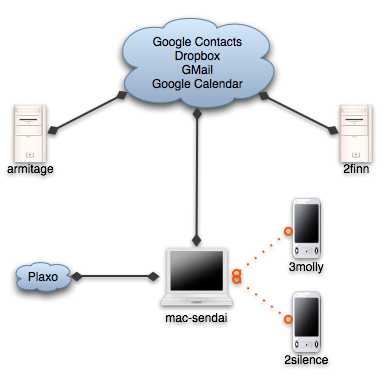
Having three different machines that I work with daily tends to cause me some pain whenever I try to send an email from the two that are work/fun related. I've got 3 pcs that I use on a daily basis:

  • My personal laptop is a black Macbook called mac-sendai. It handles my email, IM, photos, videos and contacts. My social life is stored in it, being it work or personal and I carry it around for most of the time.
  • My home machine is armitage. It's a Windows XP machine that I use mostly as a gaming/movie machine.
  • My work machine is 2finn. It runs Windows Vista 64 and is my main development machine at the office.

From each of the 3 pcs I usually need to send off emails. I use Gmail on any of the desktops and Mail.app on the laptop. Since mac-sendai handles the social part, my address book there is where I aggregate and collate most of the information about contacts and sync both the cell phone and an ipod touch to it.

Up until now the only connection to the cloud was from the laptop to Plaxo, to get auto-updates for contact information of friends and "business associates". It works rather well and the best way to prove it is that most of the time I don't even notice it.

But lately I've noticed that OS X is able to sync remotely to google contacts, and since I use gmail on the desktops, having it synchronized with the address books is the last step in having a always available and up to date contact store on all machines, with the added benefits of remote backups (besides the time machine I store at home).

So nowadays here's the replication flow for my "personal network":

Sync network

  • Dropbox handles the "utils", which are about 50 or 100 megs of portable apps including notepad2, gnu utils and Launchy's preferences, current working set documents, emacs site-lisp and .emacs. Some time ago I used foldershare for the utils, but it was too finicky, and with hard links from the dropbox to the correct places, it all works much better.
  • Gmail handles the email. I've used IMAP even before gmail on all desktop programs and now on the ipod touch, so I haven't even thought about that particular issue for a while.
  • Google Calendar keeps some of my appointments, with a shared calendar for weListen.
  • And now, Google Contacts stores the emails and phone numbers for my little social network.

The migration of contacts ended up costing about half an hour of deduplication and merging, but thankfully the address book includes a shortcut to merge contacts, so most of the time it was spent cleaning up emails that I don't need and just checking the contacts to see that nothing was mangled.

My biggest worry now is that the address book will become bloated. GMail adds any address that you send email to to the contacts list, and most of the time if it's a one time only reply I won't want it to be replicated, so the jury's still out on how I'll handle that.

But for now, I'm a happy camper. No more copy pasting of emails, and my inner software engineer feels more confortable at not having duplicated information spread around.

Edit: thanks to Edgar Gonçalves for the title fix :) In my defence Starbucks had no wifi, and I was unsure of the correct title :)

Sunday, 7 December 2008

2 more apps I end up installing on all computers I use.

Foldershare, set to sync my utils folder, which includes putty, teracopy, some gnu command line utils, a couple of scripts to start and stop services, .net reflector, keepass binary, notepad2, and some other portable apps that I end up collecting over time.

Dropbox, mostly for the public folder. The explorer/finder integration is a wonderful piece of magic. Dropping a file on the public folder and using the "Copy the public link" item on the context menu ended up being my favorite way to share files with the world.

Wednesday, 26 November 2008

First shot at a couchdb installer on windows

Disclaimer: this is for the brave folks who wish to try things out. So far I've only tested the installer on my own machine and on a clean Windows XP vmware image.

Now for the running bits: here's a first try at getting a workable couchdb installer on Windows.

There were some instructions down at the wiki on how to get all the bits and bobs running together, but parts of it required a C compiler and some rather tedious setup on part of the user. It was also a bit frail, as noted by me trying for a couple of afternoons to get the unit tests to pass.

The biggest problem was that Spidermonkey must be compiled in a specific way (one that wasn't apparent to me at first), which I dismissed at first because the blog containing the steps was down. Also, one must use lowercase paths on the config file, otherwise erlang will choke when trying to open the database files.

The next step would be to create a shortcut on the start menu, get some sensical text on the installer, do some error checking to find out if the prerequisites are installed, and create an uninstaller.

For now, here's the installer for the world to try. Leave a comment if you find a problem or have a suggestion.

Sunday, 12 October 2008

My first Visual Studio Plugin - CullWindows

okay, that was hell...

In the .net world I usually work with the wonder tool that is Resharper. For this particular story, the main points are the hugely useful navigation shortcuts: Go to symbol, Go to file, Go to type, Navigate to implementation, Navigate to base, you get the picture.

So, the Solution Explorer window usually doesn't get much work, but the tab strip on top is cluttered beyond recognition even after just half an hour or two of work. And while most of the source navigation is done via shortcuts, sometimes it's handy to just click on the respective tab. Just try and find it amidst 20 other files.

Hence, my idea to expand Visual Studio with the simple ability to keep just the top X files I use.

Meet CullWindows. Direct download link here, google code home page here. A simple solution to a simple problem. It was the implementation that was hell.

The Plugin

The plugin's logic is quite simple. Keep track of which files are opened for editing. When the user views a file, see if we've hit the limit. If we have, close documents, from last to first, until we're back on the limit. Ignore unsaved files, and things that are not files.

The limit is configured on the Visual Studio Options panel, under Cull Windows.

The installed is "dumb", meaning it won't give you any feedback, and just install and go away. I'm sorry for that.

For now the plugin is Visual Studio 2008 only, no version for 2005, mostly because I don't use it. If there's any demand, I may give it a try.

The Implementation

Firstly, I created an add-in. Seeing an example that came with the SDK, I managed to get a reference to the Running Documents Table, which contains all currently opened documents, and registered an event sink to listen for changes in the table.

This was all good until I get home and try the same code on another computer. There, the table was nowhere to be found, and found no error. I could've tried to debug it for some time, but it seemed better to just restart it.

Next up, a VSPackage. From what I had gathered, it is a "new" and more powerful way to extend VS, and the API and samples seemed to be a bit more OO. I managed to get it to work, again, but now the debugging is a bit stranger than when it was an add-in, since it now needs to be installed on the registry hive for the IDE.

Most of the interaction is a bit nasty from someone used to clean, object oriented APIs. It seems most of the extensibility points in Visual studio are done via COM, which is a beast I've encountered few times before, and I dont' keep fond memories from those occasions. It may be that I'm too new working with it, but the code that resulted wasn't exactly... pleasant. Feel free to browse the code. It isn't pretty, specially the first iterations, but I'm open to suggestions and criticisms.

Now, the API is HUGE. There are hundreds of interfaces on each of the Visual Studio namespaces, and trying to get from one point to another is somewhat tiring. I have a document cookie from the event handler, now how to get the name of the file. Okay, have the name, now how can I find if it is modified. Where to keep the preferences, and how to access them. There were some concepts which I lacked, but mostly it was just be being a newbie at it and not knowing where to look.

The solution ended up being simply 3 files: the package, the document monitor and the options page.

The package was built mostly by the VSPackage template, and the only things I changed was to remove the menu item, add the option pane and build the document monitor. Some of the attribute values were a matter of faith on the documentation, and I didn't dare touch most of the generated code.

The document monitor does the grunt work of maintaining a document list, ordered by access date, listening to the running document table events, and closing documents when the limit is reached. The first implementation was fetching the window frames from the UI shell and iterating through it to find the one with the file to close. Not optimal by a long shot, but worked. A second (and final) iteration used the IsDocumentOpen method from VsShellUtilities to get the window frame. This was not intuitive. I expected a method starting with Is to just return true or false, and not return more information.

The option page was actually the easier part, with all of the work taken care of by the DialogPage class, including persistence. It's a bit too much magic for my tastes, but it works. I was supposed to access the options via DTE, but it kept throwing an invalid cast exception, and I gave up and just passed the option page object to the monitor.

The Next Steps

The first implementation is done, but I think I can make it a bit smarter if I have the time:

  • Ponder the amount of time spent on a given file when picking which one to remove. This would prevent newer files which were opened by mistake to stay opened when earlier files which had more use go away.
  • Keep a background timer to cull windows after some time with no visits to the document.
  • Have the installed say something instead of just installing and going away.

I guess that's all for now, thanks for tuning in.

Monday, 21 July 2008

Perhaps extra keys on a keyboard aren't that bad an idea...

on the newfound use of useless keys

Whilst my work is nowadays mostly done on my macbook (running windows, much to my lament), at home I usually drop the laptop besides my desktop, boot it into mac os x, and use it as a communications central with email and IM open while working on some other thing on the desktop. Call it a strange dual-head, quad-core computing station.

Instead of switching around keyboards when I need to pass from one computer to the other, I use (and profoundly adore) synergy, which allows one keyboard+mouse combo to control more than one computer, via the network. But until now, to change from one computer to another (let's say to talk to someone on IM) my hand had to leave the home keys of the keyboard to use the mouse to move from one computer to the other (since synergy uses the edges of the monitor to cross control from one computer to another).

But no more! Remembering some button with "hotkeys" on the label on the configuration manager, I managed to bind two keys, one to move left, other to move right. But then the dilema... which keys?

I didn't want a hard, multiple key, emacs-like, binding. I was looking for a short stroke to allow for quick back-and-forth, since that was the most common scenario (coding on the desktop, and going to the laptop to spout nonsense on im and back again to serious business).

Enter the most useless keys on my current keyboard, a logitech internet navigator. A fine keyboard all in all, with a wheel on the left side (which I tend to use quite often, as a matter of fact) and two keys below it, go and back.

Previously useless keys

Bind go for left, back to right and we've got a pan-computer Alt-Tab.

Joy.

Friday, 2 May 2008

Python, windows, sockets and Ctrl-c

One of the minor annoyances of python on windows has to do with the sockets' blocking behavior.

Python's libs have several implementations of simple server loops, where the server listens for connections or specific requests and passes it on to a handler function on your code. To do so, the server blocks on an accept or read. Which, on Windows, means you can't ctrl-c out of a server process to test a code change.

To get around this little quirk I found a small workaround. We need two tools:

  • PsKill to kill the python process

Stick an infinite loop outside the python script (like this "while (1) { server.py }"). Now, open another command prompt (I use Console for managing those) and, when you want to reload the server, just run "pskill python". Sadly this kills all python sessions currently running, which may not be what you want. But for now it works well enough.

Monday, 28 April 2008

My personal list of must-install apps

For the umpteenth time I re-installed windows today on armitage (my desktop). For the first time I did it from a flash drive, since my dvd reader was on the fritz. I considered buying a new one, but after spending quite a lot upgrading the computer, I felt some effort could be spent in trying out the usb method. Much to my amazement it turned out to be quite easy. This link explained everything, and is actually quite straightforward. But that's not the point here, this is:

Synergy

Small application which allows one computer to control many via the network. A godsend for us with both laptop and desktop, an a desire to have more screens than a stock market analyst.

ClipX

Kill ring for windows. Before, I had to remember to get a notepad window, paste the clipboard I wanted to use afterwards, copy something, go back to notepad, rinse, wash, repeat. How in the 9 circles of hell did I live like that I don't know. But now that way is no more. ClipX remembers the copy operations you make, and has a pretty intuitive way to go back and forth.

Launchy

I understand the need for a start menu. I just don't understand why must I use it every single time I want to open a browser, visual studio or anything else. This one takes care of that. Not as good as Quicksilver, but it's good enough for me not to rip out my eyeballs out while trying to get stuff done.

Dexpot

The sanest virtual desktop manager for windows. Works extremely well almost all the time, and stays out of your way.