written in full blown hipster <censured> mode on a macbook, listening to an ipod and sipping an iced mocca at a starbucks.
Having three different machines that I work with daily tends to cause me some pain whenever I try to send an email from the two that are work/fun related. I've got 3 pcs that I use on a daily basis:
- My personal laptop is a black Macbook called mac-sendai. It handles my email, IM, photos, videos and contacts. My social life is stored in it, being it work or personal and I carry it around for most of the time.
- My home machine is armitage. It's a Windows XP machine that I use mostly as a gaming/movie machine.
- My work machine is 2finn. It runs Windows Vista 64 and is my main development machine at the office.
From each of the 3 pcs I usually need to send off emails. I use Gmail on any of the desktops and Mail.app on the laptop. Since mac-sendai handles the social part, my address book there is where I aggregate and collate most of the information about contacts and sync both the cell phone and an ipod touch to it.
Up until now the only connection to the cloud was from the laptop to Plaxo, to get auto-updates for contact information of friends and "business associates". It works rather well and the best way to prove it is that most of the time I don't even notice it.
But lately I've noticed that OS X is able to sync remotely to google contacts, and since I use gmail on the desktops, having it synchronized with the address books is the last step in having a always available and up to date contact store on all machines, with the added benefits of remote backups (besides the time machine I store at home).
So nowadays here's the replication flow for my "personal network":
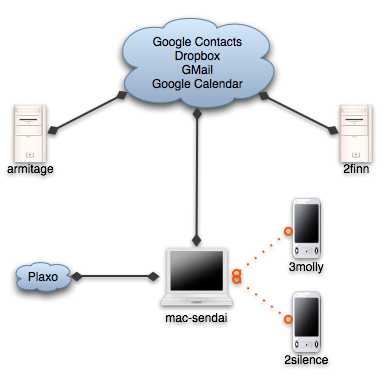
- Dropbox handles the "utils", which are about 50 or 100 megs of portable apps including notepad2, gnu utils and Launchy's preferences, current working set documents, emacs site-lisp and .emacs. Some time ago I used foldershare for the utils, but it was too finicky, and with hard links from the dropbox to the correct places, it all works much better.
- Gmail handles the email. I've used IMAP even before gmail on all desktop programs and now on the ipod touch, so I haven't even thought about that particular issue for a while.
- Google Calendar keeps some of my appointments, with a shared calendar for weListen.
- And now, Google Contacts stores the emails and phone numbers for my little social network.
The migration of contacts ended up costing about half an hour of deduplication and merging, but thankfully the address book includes a shortcut to merge contacts, so most of the time it was spent cleaning up emails that I don't need and just checking the contacts to see that nothing was mangled.
My biggest worry now is that the address book will become bloated. GMail adds any address that you send email to to the contacts list, and most of the time if it's a one time only reply I won't want it to be replicated, so the jury's still out on how I'll handle that.
But for now, I'm a happy camper. No more copy pasting of emails, and my inner software engineer feels more confortable at not having duplicated information spread around.
Edit: thanks to Edgar Gonçalves for the title fix :) In my defence Starbucks had no wifi, and I was unsure of the correct title :)

