Showing posts with label personal. Show all posts

Thursday, 11 June 2009

Dr. Googlelove or: How I Learned to Stop Worrying and Love the Cloud

written in full blown hipster <censured> mode on a macbook, listening to an ipod and sipping an iced mocca at a starbucks.

Having three different machines that I work with daily tends to cause me some pain whenever I try to send an email from the two that are work/fun related. I've got 3 pcs that I use on a daily basis:

  • My personal laptop is a black Macbook called mac-sendai. It handles my email, IM, photos, videos and contacts. My social life is stored in it, being it work or personal and I carry it around for most of the time.
  • My home machine is armitage. It's a Windows XP machine that I use mostly as a gaming/movie machine.
  • My work machine is 2finn. It runs Windows Vista 64 and is my main development machine at the office.

From each of the 3 pcs I usually need to send off emails. I use Gmail on any of the desktops and Mail.app on the laptop. Since mac-sendai handles the social part, my address book there is where I aggregate and collate most of the information about contacts and sync both the cell phone and an ipod touch to it.

Up until now the only connection to the cloud was from the laptop to Plaxo, to get auto-updates for contact information of friends and "business associates". It works rather well and the best way to prove it is that most of the time I don't even notice it.

But lately I've noticed that OS X is able to sync remotely to google contacts, and since I use gmail on the desktops, having it synchronized with the address books is the last step in having a always available and up to date contact store on all machines, with the added benefits of remote backups (besides the time machine I store at home).

So nowadays here's the replication flow for my "personal network":
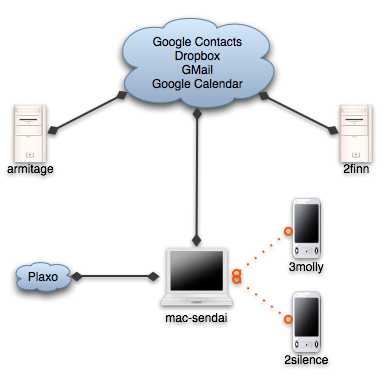
Sync network

  • Dropbox handles the "utils", which are about 50 or 100 megs of portable apps including notepad2, gnu utils and Launchy's preferences, current working set documents, emacs site-lisp and .emacs. Some time ago I used foldershare for the utils, but it was too finicky, and with hard links from the dropbox to the correct places, it all works much better.
  • Gmail handles the email. I've used IMAP even before gmail on all desktop programs and now on the ipod touch, so I haven't even thought about that particular issue for a while.
  • Google Calendar keeps some of my appointments, with a shared calendar for weListen.
  • And now, Google Contacts stores the emails and phone numbers for my little social network.

The migration of contacts ended up costing about half an hour of deduplication and merging, but thankfully the address book includes a shortcut to merge contacts, so most of the time it was spent cleaning up emails that I don't need and just checking the contacts to see that nothing was mangled.

My biggest worry now is that the address book will become bloated. GMail adds any address that you send email to to the contacts list, and most of the time if it's a one time only reply I won't want it to be replicated, so the jury's still out on how I'll handle that.

But for now, I'm a happy camper. No more copy pasting of emails, and my inner software engineer feels more confortable at not having duplicated information spread around.

Edit: thanks to Edgar Gonçalves for the title fix :) In my defence Starbucks had no wifi, and I was unsure of the correct title :)

Wednesday, 22 April 2009

My delicious tag wordle

Does it show that I am a .net developer with a python deviancy?

Delicious Tag Wordle.png

Sunday, 7 December 2008

2 more apps I end up installing on all computers I use.

Foldershare, set to sync my utils folder, which includes putty, teracopy, some gnu command line utils, a couple of scripts to start and stop services, .net reflector, keepass binary, notepad2, and some other portable apps that I end up collecting over time.

Dropbox, mostly for the public folder. The explorer/finder integration is a wonderful piece of magic. Dropping a file on the public folder and using the "Copy the public link" item on the context menu ended up being my favorite way to share files with the world.

Tuesday, 28 October 2008

Thank you guys!

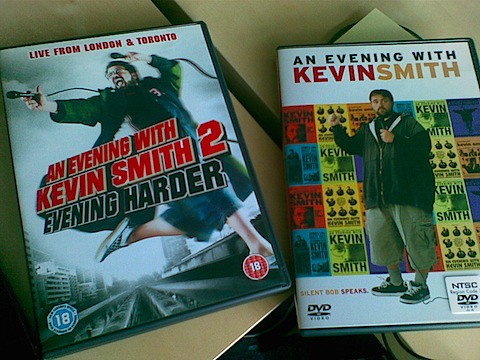
My great friends and colleagues at weListen just offered my these two wonderful sets of DVDs for my birthday:

birthday presents

These are Q&A sessions Kevin Smith does at packed theaters with thousands of people, and where he talks about everything and anything. It includes some inside jokes for his Askewniverse fans, and each disk is about an hour and a half of him just having fun with the audience. And that's the brilliance of it. It really is just a dude with some great stories having fun with people who dig his work, and he just goes with the flow, having people from the audience up on the stage for whatever reason it is at the time, or going on a binge discussing Prince's flamboyance.

For anyone who's a fan of Kevin Smith's movies, these dvds are must see. And I really thank the guys at work for the gift. :D

Friday, 17 October 2008

Unexpected change

Got home at 11pm. General slouch mode before bedtime engaged. Open firefox for one last news feed round and look at a large change on iGoogle.

My iGoogle page is "designed" to fit on one 20" screen at 1650x1050 or thereabouts. I want to open it, scan it quickly for any big news and move on. Now it takes two screens with a short description for each feed item (as most of the widgets are based on newspapers and tv channels' feeds), which kind of defeats the purpose. Also, the tabs moved to the left, which may be a good option for today's wide screens, but looks a bit odd having lots of negative space on a vertical bar.

Thankfully a quick trip to the tab's settings shows me a way to remove the new feed behavior and return the page to a more sane, no scroll, quick scan mode. It also shows a manual backup for the iGoogle page, and export settings. May pay someday to add these settings to the backup jobs at home.

Monday, 29 September 2008

More Buxfer goodies (this time, a backup script)

I just realized that I'm putting a fair amount of effort (and information) on Buxfer. Been tracking rather faithfully my expenses for a month, and I'm rather happy with the service.

But what if it someday fails, or disappears? What about the data? It seems to have a data export facility implemented, but it's for Pro accounts only. Okay, it seems like either I misread the membership plans, or they changed them. Either way, the data export is good for when you want to take a look at the statements in excel, but as far as a backup goes, it's no good for me.

A backup must be something I don't have to think about for it to work. It should do its job in the background as much as possible, and only warn me if something goes wrong. Thankfully Buxfer's API has enough functionality to cover this.

This is a small script that fetches all transactions from your Buxfer accounts (or one particular account) to disk. It has some smarts implemented to "continue" a previous backup, so you can setup a scheduled task periodically to fetch the transactions, and it should just fetch the new ones after the first run.

So far it stores the info as pure json, which was the easiest way to implement it. Should I require in the future to actually act on this, I can parse the json again and convert it to csv, or any other format I need.

The source is here, and a skeleton configuration file is here.

To use it you'll need Python (I tested it with 2.5, but I think it should work with 2.4) and simplejson.

Configuration should be self-explanatory, it needs you to fill out your username, password, and filename for backup.

To run it, you can pass the path to the configuration file (this way you can have several different configurations, one for each account, or for different users).

I guess this is it. Any questions, feedback or general chat, just leave a comment.

That's all, folks!

Wednesday, 10 September 2008

Waiting.

on the topic of forced rest time

I actually like waiting for someone at the airport. Of course, this may have something to do with the fact that this only happens once in a while, when I do so I've got my trusty macbook with me, and that I'm not all that eternally busy that I can't spare some time to sit at a coffee shop with wireless.

Not that I do much work, or read all that much, or have a positive contribution to give the world while I'm sitting here. I actually spend most of the time just enjoying people going to and fro or milling about while waiting, like me, for someone else. The coffee shop I'm sitting in has about 32 tables, and it's directly in front of the arrival gate. There are 12 people here, all of them sitting the same way, having a dring, chatting on the phone or just waiting with a bit of a blank stare.

And I'm talking about a mildly peripheral airport like the Lisbon one, which I bet doesn't have one tenth of the cultural cross section of a Heathrow, or an LAX. On the other hand, because it's a smallish one, I can sit at the coffee shop and view most of the arrivals, and it doesn't sound hectic or too crowded. It's just a bunch of people. Waiting.

And you can play a small game, while waiting. Try to think of all these people, every single one of them, as an distinct individual, not just "people". With needs, thoughts, desires, passions, pains and hungers. All of them have a single shared purpose here, but that can be the only thing that they have in common. Imagine the diversity. The blonde lady, dressed in a white short sleeve which passes you? Is she coming or going? Where to? The couple (or so you assume, it's a man and a woman, they could be brothers, or just friends) with the large backpacks. Travelling the world, vacations or volunteer work? The black family, waiting for a relative? Perhaps a son, gone abroad to meet some friends. Of course, the suit, lugging his laptop luggage, blackberry on hand talking and looking just a bit lost, almost (just almost) looking like it's the first time he's here.

And then it starts thinning out. More people are leaving than arriving. There are less flights. And now it's my turn to go. My charge has arrived.

Tuesday, 2 September 2008

v1.1 of BuxferSubmit

For the impatient:

New version. Should not freeze if Buxfer is slow to respond or if you forget to plug in the cable. Also some better handling of special characters while talking to the server.

Download here.

For the curious:

Buxfer seemed to have had a bit of trouble with site slowness, which exposed my cluelessness in developing widgets that connect to web services (as in, forgot to consider timeouts of XMLHttpRequests).

I was a bit amazed to find neither much info on Apple's site nor on the web on how to best handle these problems. Ended up just setting a timeout before the request, clearing it on success and canceling the request should the timeout happen. Perhaps I should look into a javascript library such as mochikit or jquery to help with the heavy lifting.

Also, most of the code feels to me a bit fragile. The error handling is primitive, and the fact that the request is async makes me a bit queasy. I'll chalk that up to immaturity on my part in developing in javascript, but I hope to have the time to refactor it a bit.

As I said before, the code is up on google code, so feel free to browse around, all three of you who are reading this :)

Saturday, 30 August 2008

Google Code page for the widget

Well, instead of just having a zip file containing the source code, I decided to put it up on google code. The page is here and I've updated the homepage to include a link to it. The releases will live there, also, and I think I'll look into getting the widget to autoupdate or something, with the files on google code I think I can get an rss feed to the releases.

I'll keep y'all posted.

Buxfer widget

If you follow my twitter feed, you may have noticed that I’ve created and published a small widget to use with buxfer here. Right now it’s just two forms, one to submit and one to configure, and it isn’t all that smart at what it does.

My intent is to keep the interface simple, but to improve on three points:
- Usability-wise, I want to be faster at adding the transaction, and perhaps have some suggestion or completion for the tags. Right now it is a bit dumb, and doesn’t provide much help besides being a form.
- As far as the interface goes, I want it to occupy a bit less space, and to be prettier. As you can see on the screenshot, the widget uses the standard parts and the labels have the default size. I think I can do better than that and still keep it usable.
- The configuration is stored on the preferences cache for widgets Apple provides, which isn’t quite the best choice as far as storing sensitive data. I should put it in the keychain, and perhaps even use the same as Safari.

I was quite impressed with the ease with which you can produce widgets. Having Dashcode helps a lot, both with the layout of the forms and the debugging of the code. Widgets being based on javascript and html gives them a low entry cost if one is already used to client-side web programming, and opens up the opportunity for some rather interesting moves, such as using JQueryUI or Moo on the widget.

If you’ve tried the widget and want to leave feedback, please, feel free to contact me or to drop a comment here :)

Monday, 21 July 2008

Perhaps extra keys on a keyboard aren't that bad an idea...

on the newfound use of useless keys

Whilst my work is nowadays mostly done on my macbook (running windows, much to my lament), at home I usually drop the laptop besides my desktop, boot it into mac os x, and use it as a communications central with email and IM open while working on some other thing on the desktop. Call it a strange dual-head, quad-core computing station.

Instead of switching around keyboards when I need to pass from one computer to the other, I use (and profoundly adore) synergy, which allows one keyboard+mouse combo to control more than one computer, via the network. But until now, to change from one computer to another (let's say to talk to someone on IM) my hand had to leave the home keys of the keyboard to use the mouse to move from one computer to the other (since synergy uses the edges of the monitor to cross control from one computer to another).

But no more! Remembering some button with "hotkeys" on the label on the configuration manager, I managed to bind two keys, one to move left, other to move right. But then the dilema... which keys?

I didn't want a hard, multiple key, emacs-like, binding. I was looking for a short stroke to allow for quick back-and-forth, since that was the most common scenario (coding on the desktop, and going to the laptop to spout nonsense on im and back again to serious business).

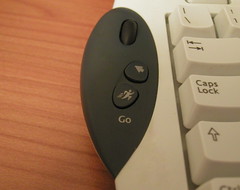
Enter the most useless keys on my current keyboard, a logitech internet navigator. A fine keyboard all in all, with a wheel on the left side (which I tend to use quite often, as a matter of fact) and two keys below it, go and back.

Previously useless keys

Bind go for left, back to right and we've got a pan-computer Alt-Tab.

Joy.

Wednesday, 7 May 2008

The biggest disadvantage to a coffee machine at home...

... is the period while you adapt to having a coffee machine at home.

The one where you learn when not to drink coffee.

The same one where you end up awake at 6am because you just had to get a cup of delicious, tasteful, awesomely scented java after dinner.

Live and learn...

Monday, 28 April 2008

My personal list of must-install apps

For the umpteenth time I re-installed windows today on armitage (my desktop). For the first time I did it from a flash drive, since my dvd reader was on the fritz. I considered buying a new one, but after spending quite a lot upgrading the computer, I felt some effort could be spent in trying out the usb method. Much to my amazement it turned out to be quite easy. This link explained everything, and is actually quite straightforward. But that's not the point here, this is:

Synergy

Small application which allows one computer to control many via the network. A godsend for us with both laptop and desktop, an a desire to have more screens than a stock market analyst.

ClipX

Kill ring for windows. Before, I had to remember to get a notepad window, paste the clipboard I wanted to use afterwards, copy something, go back to notepad, rinse, wash, repeat. How in the 9 circles of hell did I live like that I don't know. But now that way is no more. ClipX remembers the copy operations you make, and has a pretty intuitive way to go back and forth.

Launchy

I understand the need for a start menu. I just don't understand why must I use it every single time I want to open a browser, visual studio or anything else. This one takes care of that. Not as good as Quicksilver, but it's good enough for me not to rip out my eyeballs out while trying to get stuff done.

Dexpot

The sanest virtual desktop manager for windows. Works extremely well almost all the time, and stays out of your way.

Friday, 25 April 2008

Dual core ftw!

One of my small gripes with games are that you can't usually alt-tab out of them. This results in lossage of time when you happen to press a key which shows the start menu, or a modal dialog pops up (yes, I'm looking at you, windows firewall), or when you just need to pause out of a game to see some other thing.

Well, I think that's a problem no more!

task manager.jpg

Given a dual-core processor and the propensity of games to be monothreaded, I can now alt-tab out of a game, do what I must and return to it without having to spend half an hour waiting for it. On the other hand, 2 Gb of ram almost seems too little nowadays...

Thursday, 10 January 2008

Good customer service pays off

Monday I went to a sports superstore to get some clothes as additional motivators for getting in shape. Expecting a supermarket of sports goods, I did most of the shopping by myself, getting a set of pants, some sweatshirts and eyeballing a GPS thingamajig which I set as a reward in a couple of months should I be good and reach my goals. But when I came to the shoes I actually was a bit undecided. Most of the other articles were rather straightforward. I had a clear picture of what I wanted, and the prices matched what I was willing to give. Not so much for a set of running shoes, which went from 20/30€ all the way to 120€. The adverts or informational flyers talked about how the lower priced items were for small walks or runs, once a week, in good conditions. The more expensive ones talked about competitive running, more frequently and in all conditions. So, instead of simmering over which ones I should pick, I called up on someone from the shop to ask what really was the difference and why were some marked as for once in a while jogging, and others more frequent running. To my (somewhat dumb) amazement, the clerk dropped what she was doing, and started explaining. So the whole frequency thing has to do with durability. If I'm going to run once in a while, less expensive shoes will do for a couple of years. But ramp up and those shoes last only months. Also, I should be on the look out for softer sole, which usually is better for jogging since it molds better to the motion of the foot. After fetching 3 or 4 pairs, the advantages of each were discussed, and the main points of how a set of shoes should be picked. I ended up buying the first and foremost recommendation of a brand I didn't knew about, in spite of trying both an adidas and a reebok pair. All in all, 10 minutes later and 5 pairs tried out, a client wishing to spend 30€ was convinced to spend 60€. And was happy about it. I got to try the different options, and was given good reasons for a more expensive buy from someone who was willing to spend the time to inform. The main point? Good, qualified, knowledgeable and, most of all, willing customer facing employees are worth their price, for the shop and for the client.