Sunday, 7 December 2008

2 more apps I end up installing on all computers I use.

Foldershare, set to sync my utils folder, which includes putty, teracopy, some gnu command line utils, a couple of scripts to start and stop services, .net reflector, keepass binary, notepad2, and some other portable apps that I end up collecting over time.

Dropbox, mostly for the public folder. The explorer/finder integration is a wonderful piece of magic. Dropping a file on the public folder and using the "Copy the public link" item on the context menu ended up being my favorite way to share files with the world.

Wednesday, 26 November 2008

First shot at a couchdb installer on windows

Disclaimer: this is for the brave folks who wish to try things out. So far I've only tested the installer on my own machine and on a clean Windows XP vmware image.

Now for the running bits: here's a first try at getting a workable couchdb installer on Windows.

There were some instructions down at the wiki on how to get all the bits and bobs running together, but parts of it required a C compiler and some rather tedious setup on part of the user. It was also a bit frail, as noted by me trying for a couple of afternoons to get the unit tests to pass.

The biggest problem was that Spidermonkey must be compiled in a specific way (one that wasn't apparent to me at first), which I dismissed at first because the blog containing the steps was down. Also, one must use lowercase paths on the config file, otherwise erlang will choke when trying to open the database files.

The next step would be to create a shortcut on the start menu, get some sensical text on the installer, do some error checking to find out if the prerequisites are installed, and create an uninstaller.

For now, here's the installer for the world to try. Leave a comment if you find a problem or have a suggestion.

Tuesday, 28 October 2008

Thank you guys!

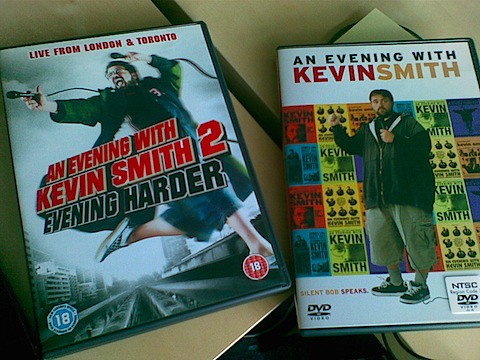
My great friends and colleagues at weListen just offered my these two wonderful sets of DVDs for my birthday:

birthday presents

These are Q&A sessions Kevin Smith does at packed theaters with thousands of people, and where he talks about everything and anything. It includes some inside jokes for his Askewniverse fans, and each disk is about an hour and a half of him just having fun with the audience. And that's the brilliance of it. It really is just a dude with some great stories having fun with people who dig his work, and he just goes with the flow, having people from the audience up on the stage for whatever reason it is at the time, or going on a binge discussing Prince's flamboyance.

For anyone who's a fan of Kevin Smith's movies, these dvds are must see. And I really thank the guys at work for the gift. :D

Friday, 17 October 2008

Unexpected change

Got home at 11pm. General slouch mode before bedtime engaged. Open firefox for one last news feed round and look at a large change on iGoogle.

My iGoogle page is "designed" to fit on one 20" screen at 1650x1050 or thereabouts. I want to open it, scan it quickly for any big news and move on. Now it takes two screens with a short description for each feed item (as most of the widgets are based on newspapers and tv channels' feeds), which kind of defeats the purpose. Also, the tabs moved to the left, which may be a good option for today's wide screens, but looks a bit odd having lots of negative space on a vertical bar.

Thankfully a quick trip to the tab's settings shows me a way to remove the new feed behavior and return the page to a more sane, no scroll, quick scan mode. It also shows a manual backup for the iGoogle page, and export settings. May pay someday to add these settings to the backup jobs at home.

Sunday, 12 October 2008

My first Visual Studio Plugin - CullWindows

okay, that was hell...

In the .net world I usually work with the wonder tool that is Resharper. For this particular story, the main points are the hugely useful navigation shortcuts: Go to symbol, Go to file, Go to type, Navigate to implementation, Navigate to base, you get the picture.

So, the Solution Explorer window usually doesn't get much work, but the tab strip on top is cluttered beyond recognition even after just half an hour or two of work. And while most of the source navigation is done via shortcuts, sometimes it's handy to just click on the respective tab. Just try and find it amidst 20 other files.

Hence, my idea to expand Visual Studio with the simple ability to keep just the top X files I use.

Meet CullWindows. Direct download link here, google code home page here. A simple solution to a simple problem. It was the implementation that was hell.

The Plugin

The plugin's logic is quite simple. Keep track of which files are opened for editing. When the user views a file, see if we've hit the limit. If we have, close documents, from last to first, until we're back on the limit. Ignore unsaved files, and things that are not files.

The limit is configured on the Visual Studio Options panel, under Cull Windows.

The installed is "dumb", meaning it won't give you any feedback, and just install and go away. I'm sorry for that.

For now the plugin is Visual Studio 2008 only, no version for 2005, mostly because I don't use it. If there's any demand, I may give it a try.

The Implementation

Firstly, I created an add-in. Seeing an example that came with the SDK, I managed to get a reference to the Running Documents Table, which contains all currently opened documents, and registered an event sink to listen for changes in the table.

This was all good until I get home and try the same code on another computer. There, the table was nowhere to be found, and found no error. I could've tried to debug it for some time, but it seemed better to just restart it.

Next up, a VSPackage. From what I had gathered, it is a "new" and more powerful way to extend VS, and the API and samples seemed to be a bit more OO. I managed to get it to work, again, but now the debugging is a bit stranger than when it was an add-in, since it now needs to be installed on the registry hive for the IDE.

Most of the interaction is a bit nasty from someone used to clean, object oriented APIs. It seems most of the extensibility points in Visual studio are done via COM, which is a beast I've encountered few times before, and I dont' keep fond memories from those occasions. It may be that I'm too new working with it, but the code that resulted wasn't exactly... pleasant. Feel free to browse the code. It isn't pretty, specially the first iterations, but I'm open to suggestions and criticisms.

Now, the API is HUGE. There are hundreds of interfaces on each of the Visual Studio namespaces, and trying to get from one point to another is somewhat tiring. I have a document cookie from the event handler, now how to get the name of the file. Okay, have the name, now how can I find if it is modified. Where to keep the preferences, and how to access them. There were some concepts which I lacked, but mostly it was just be being a newbie at it and not knowing where to look.

The solution ended up being simply 3 files: the package, the document monitor and the options page.

The package was built mostly by the VSPackage template, and the only things I changed was to remove the menu item, add the option pane and build the document monitor. Some of the attribute values were a matter of faith on the documentation, and I didn't dare touch most of the generated code.

The document monitor does the grunt work of maintaining a document list, ordered by access date, listening to the running document table events, and closing documents when the limit is reached. The first implementation was fetching the window frames from the UI shell and iterating through it to find the one with the file to close. Not optimal by a long shot, but worked. A second (and final) iteration used the IsDocumentOpen method from VsShellUtilities to get the window frame. This was not intuitive. I expected a method starting with Is to just return true or false, and not return more information.

The option page was actually the easier part, with all of the work taken care of by the DialogPage class, including persistence. It's a bit too much magic for my tastes, but it works. I was supposed to access the options via DTE, but it kept throwing an invalid cast exception, and I gave up and just passed the option page object to the monitor.

The Next Steps

The first implementation is done, but I think I can make it a bit smarter if I have the time:

  • Ponder the amount of time spent on a given file when picking which one to remove. This would prevent newer files which were opened by mistake to stay opened when earlier files which had more use go away.
  • Keep a background timer to cull windows after some time with no visits to the document.
  • Have the installed say something instead of just installing and going away.

I guess that's all for now, thanks for tuning in.

Monday, 29 September 2008

More Buxfer goodies (this time, a backup script)

I just realized that I'm putting a fair amount of effort (and information) on Buxfer. Been tracking rather faithfully my expenses for a month, and I'm rather happy with the service.

But what if it someday fails, or disappears? What about the data? It seems to have a data export facility implemented, but it's for Pro accounts only. Okay, it seems like either I misread the membership plans, or they changed them. Either way, the data export is good for when you want to take a look at the statements in excel, but as far as a backup goes, it's no good for me.

A backup must be something I don't have to think about for it to work. It should do its job in the background as much as possible, and only warn me if something goes wrong. Thankfully Buxfer's API has enough functionality to cover this.

This is a small script that fetches all transactions from your Buxfer accounts (or one particular account) to disk. It has some smarts implemented to "continue" a previous backup, so you can setup a scheduled task periodically to fetch the transactions, and it should just fetch the new ones after the first run.

So far it stores the info as pure json, which was the easiest way to implement it. Should I require in the future to actually act on this, I can parse the json again and convert it to csv, or any other format I need.

The source is here, and a skeleton configuration file is here.

To use it you'll need Python (I tested it with 2.5, but I think it should work with 2.4) and simplejson.

Configuration should be self-explanatory, it needs you to fill out your username, password, and filename for backup.

To run it, you can pass the path to the configuration file (this way you can have several different configurations, one for each account, or for different users).

I guess this is it. Any questions, feedback or general chat, just leave a comment.

That's all, folks!

Friday, 26 September 2008

v1.2 of BuxferSubmit

Version 1.2 is up at the project's page.

Direct link

Changes:

  • Uses jQuery for the async request.
  • Stores the user's password in the user's keychain (thanks to Stan Lemon for the code and plugin)
  • Minor interface tweak (pressing enter when on the tags text field submits the transaction)

That's all for now. I'd love to get some tag auto-complete, but getting a good interface for it has proven difficult.